For a long time, adding AI to a WordPress plugin usually meant making an architectural decision before writing the feature itself.
Which provider should I use?
OpenAI? Anthropic? Google?
Then came the usual work:
- build an API-key settings screen
- store credentials
- write provider-specific HTTP requests
- normalize provider responses
- handle provider-specific errors
- rewrite parts of the integration if the provider changes
WordPress 7.0 changes that model in a fairly important way.
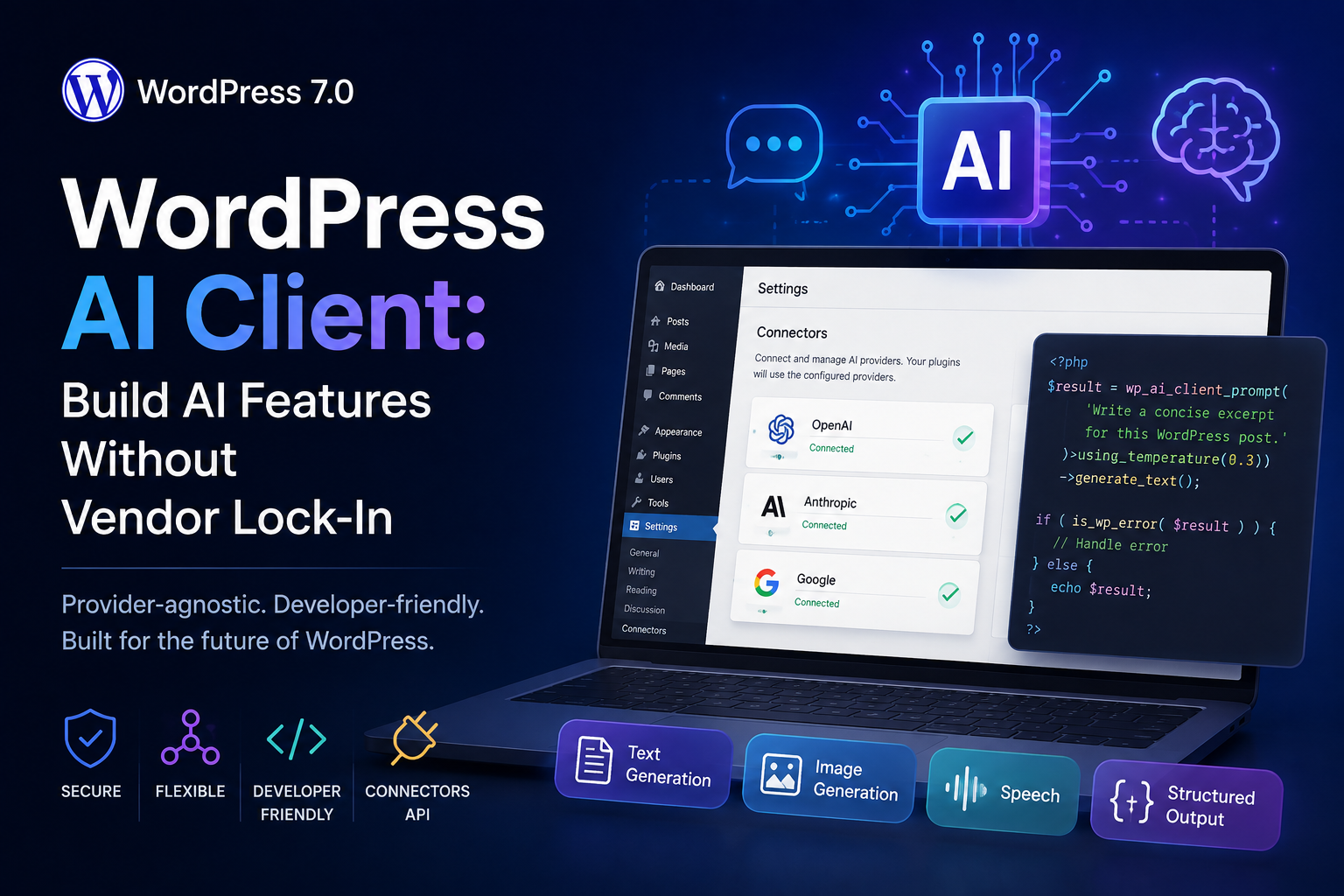
It introduces the WordPress AI Client: a provider-agnostic API built into WordPress Core that lets plugins describe the AI capability they need and lets WordPress route the request through an AI provider configured by the site owner.
That is much more interesting to me than simply putting another “Generate with AI” button inside wp-admin.
It gives WordPress developers a common AI layer.
In this guide, I want to look at what that actually means, how the API works, and how I would use it without turning every WordPress feature into an unnecessary AI feature.
What changed in WordPress 7.0?
Before WordPress 7.0, a plugin that wanted to communicate with an AI model normally owned the entire integration.
WordPress plugin
      |
      v
OpenAI-specific code
      |
      v
OpenAI API
If the plugin later wanted to support another provider, the architecture might start looking like this:
Plugin
  |
  +--- OpenAI adapter
  |
  +--- Anthropic adapter
  |
  +--- Google adapter
  |
  +--- provider settings
  |
  +--- credential storage
  |
  +--- response normalization
WordPress 7.0 introduces another layer:
Your plugin
     |
     v
WordPress AI Client
     |
     v
Configured AI provider
     |
     +--- OpenAI
     +--- Anthropic
     +--- Google
     +--- other compatible providers
Your plugin describes what it needs.
The site owner chooses which AI provider is available.
WordPress handles the connection between those two concerns.
The official WordPress developer note describes the AI Client as a provider-agnostic PHP API and is worth keeping bookmarked while working with it: Introducing the AI Client in WordPress 7.0.
Why provider independence matters
I think this is the most important part of the feature.
Imagine I build a plugin that creates a short summary from a WordPress post.
I could write:
My plugin
   |
   v
OpenAI API
Now OpenAI becomes part of the plugin architecture.
The user needs an OpenAI account. I need an OpenAI settings screen. My code knows about OpenAI models and OpenAI response formats.
With the WordPress AI Client, my plugin can instead say:
I need text generation.
Plugin
   |
   v
"I need text generation"
   |
   v
WordPress AI Client
   |
   v
Find suitable configured model
That separation is much healthier for a reusable WordPress plugin.
The new Settings → Connectors screen
WordPress 7.0 also introduces the Connectors API and a central Settings → Connectors screen.
This solves another problem that has existed in WordPress for years.
Think about a site with several integrations:
Plugin A → its API key page

Plugin B → another API key page

Plugin C → another settings page

Plugin D → another settings page
The Connectors system gives WordPress a standardized place for supported external connections.
For AI providers, WordPress 7.0 includes connector support around providers such as Anthropic, Google and OpenAI.
The site administrator chooses and configures the provider.
My feature does not need to ask users for the same API key again.
You can read the architecture in the official Connectors API developer note.
The API starts with one function
The entry point is:
wp_ai_client_prompt()A very small example looks like this:
$result = wp_ai_client_prompt(
    'Explain WordPress object caching in three sentences.'
)->generate_text();

if ( is_wp_error( $result ) ) {
    return;
}

echo esc_html( $result );
That is a surprisingly small amount of code.
More importantly, there is no provider-specific HTTP client in it.
There is no:
api.openai.com

api.anthropic.com

generativelanguage.googleapis.com
The plugin is asking WordPress for an AI capability rather than talking directly to one vendor.
Let’s build something useful: an AI excerpt helper
I don’t want the example in this article to be “write a poem about WordPress.”
Let’s use something closer to a real publishing workflow.
We’ll create a function that takes the content of a post and suggests a concise excerpt.
The important word here is suggests.
I don’t want AI automatically overwriting editorial content. I want it to produce a draft that a human can review.
Step 1: Make sure the AI Client exists
If the plugin requires WordPress 7.0 or later, I would still add a runtime check.
if ( ! function_exists( 'wp_ai_client_prompt' ) ) {
    return new WP_Error(
        'ai_client_unavailable',
        'The WordPress AI Client is not available.'
    );
}
For a dedicated plugin, I would also set:
/**
 * Requires at least: 7.0
 */
This makes the dependency clear instead of letting the plugin fail later in a less obvious way.
Step 2: Get clean post content
I don’t want to send an entire rendered HTML document to the model when the goal is only to summarize the article.
function cwj_get_post_text( int $post_id ): string {
    $post = get_post( $post_id );

    if ( ! $post instanceof WP_Post ) {
        return '';
    }

    $content = strip_shortcodes(
        $post->post_content
    );

    $content = wp_strip_all_tags(
        $content
    );

    $content = preg_replace(
        '/\s+/',
        ' ',
        $content
    );

    return trim( $content );
}
This is deliberately simple.
For a large article, I would also limit the amount of content sent to the model rather than blindly sending tens of thousands of words.
Step 3: Build the prompt
function cwj_generate_excerpt(
    int $post_id
) {
    $content =
        cwj_get_post_text(
            $post_id
        );

    if ( '' === $content ) {
        return new WP_Error(
            'empty_post',
            'The post has no content to summarize.'
        );
    }

    $prompt = sprintf(
        "Write a concise WordPress excerpt for the article below.

Requirements:
- Maximum 35 words.
- Explain what the reader will learn.
- Do not use hype.
- Do not use phrases such as 'ultimate guide' or 'game changer'.
- Do not add facts that are not present in the article.
- Return only the excerpt.

Article:

%s",
        $content
    );

    return wp_ai_client_prompt(
        $prompt
    )
        ->using_temperature( 0.3 )
        ->generate_text();
}
Notice the prompt is doing more than saying:
"Write an excerpt."I’ve given the model boundaries.
- length
- tone
- what not to invent
- expected output format
That matters much more to me than trying to find a magical prompt sentence.
Step 4: Handle failures properly
An AI provider is still an external dependency.
It can fail.
The account may have no credit. A provider may be unavailable. No compatible model may be configured. A request may be rejected.
The WordPress AI Client follows normal WordPress conventions and returns a WP_Error when generation fails.
$excerpt =
    cwj_generate_excerpt(
        $post_id
    );

if ( is_wp_error( $excerpt ) ) {
    error_log(
        sprintf(
            'AI excerpt error: %s',
            $excerpt->get_error_message()
        )
    );

    return;
}
I wouldn’t silently convert an AI failure into an empty excerpt and pretend the operation succeeded.
Check whether the required AI capability exists first
Installing WordPress 7.0 does not mean every site automatically has a working AI model.
The administrator still needs to configure a suitable provider.
The API lets us check support without actually making a paid model call.
$builder =
    wp_ai_client_prompt(
        'Generate a short excerpt.'
    );

if (
    ! $builder
        ->is_supported_for_text_generation()
) {
    // Hide or disable the AI feature.
    return;
}
I think this is an important pattern.
Don’t display a shiny AI button and wait until the user clicks it before discovering the feature cannot work.
Don’t hard-code a model unless you really need one
This would defeat a lot of the value of a provider-independent API:
"This feature only works with
one exact model from one vendor."
The AI Client supports model preferences, but they are preferences rather than strict requirements.
If there is no reason my excerpt generator needs one particular model, I would let WordPress choose an appropriate configured option.
That makes the plugin more portable.
When model preferences do make sense
There are cases where a developer knows that certain models work especially well for a feature.
The API supports:
$result =
    wp_ai_client_prompt(
        'Summarize this article.'
    )
        ->using_model_preference(
            'preferred-model-a',
            'preferred-model-b'
        )
        ->generate_text_result();
But I would make sure the feature still works when those models are unavailable.
Structured output is more useful than parsing AI prose
Suppose I want the model to return three things:
- a suggested title
- an excerpt
- three topic keywords
I could ask it to produce some nicely formatted text and then try to split that text afterward.
I would rather request structured JSON.
$schema = array(
    'type'       => 'object',

    'properties' => array(
        'title' => array(
            'type' => 'string',
        ),

        'excerpt' => array(
            'type' => 'string',
        ),

        'topics' => array(
            'type'  => 'array',
            'items' => array(
                'type' => 'string',
            ),
        ),
    ),

    'required' => array(
        'title',
        'excerpt',
        'topics',
    ),
);

$json =
    wp_ai_client_prompt(
        $prompt
    )
        ->as_json_response(
            $schema
        )
        ->generate_text();

if ( is_wp_error( $json ) ) {
    return $json;
}

$data =
    json_decode(
        $json,
        true
    );
This gives the application a predictable data contract instead of asking PHP to guess what the model meant by a heading followed by a few bullet points.
The AI Client is not only for text
The current API supports more than simple text generation.
Depending on the configured provider and model capabilities, the API includes generation methods around:
- text
- images
- speech
- text-to-speech
- video
That does not mean I would put all five into one WordPress plugin.
It means the abstraction is broader than a text-completion wrapper.
A practical image-generation example
For example, a plugin could request a generated image:
$image =
    wp_ai_client_prompt(
        'A clean editorial illustration of a WordPress block editor workspace.'
    )
        ->generate_image();

if ( is_wp_error( $image ) ) {
    return;
}

$data_uri =
    $image->getDataUri();
The official WordPress Developer Blog has a complete example that generates images and saves them into the Media Library: How to build an image generation plugin with the WordPress AI Client.
Get metadata when you need observability
For a quick feature, getting only the generated string may be enough.
For production features, I often want more information about what happened.
The AI Client provides result methods such as:
generate_text_result()

generate_image_result()
The richer result includes information such as token usage and model/provider metadata.
That becomes useful when answering questions such as:
- Which provider handled this request?
- Which model was selected?
- How much model usage did this operation consume?
- Why is one workflow suddenly becoming expensive?
AI cost is still your responsibility
Provider abstraction does not make model usage free.
If I create a button that generates ten images every time a user opens the Media Library, WordPress cannot turn that into a sensible product decision for me.
I would still think about:
- who can trigger AI operations
- how often they can run
- how much input is sent
- whether results can be cached
- whether generation is actually necessary
- how errors and usage are monitored
The WordPress API solves integration complexity.
It does not replace product or backend engineering.
Protect AI features with WordPress capabilities
I would never assume that every logged-in WordPress user should be able to invoke every AI feature.
If a feature is designed only for editors:
if (
    ! current_user_can(
        'edit_posts'
    )
) {
    return new WP_Error(
        'forbidden',
        'You are not allowed to use this feature.'
    );
}
For an administrative AI operation, I may require a stronger capability.
AI does not change WordPress’s authorization model.
It gives us another reason to use it properly.
Think carefully before sending private data
A provider-independent API can make it easy to forget that data may still be sent to an external AI provider.
If I am summarizing a public article, the risk is very different from sending:
- private customer notes
- WooCommerce order details
- medical information
- private support messages
- API credentials
- unpublished confidential content
I would design the data boundary before adding the model call.
Do not let AI silently publish content
This is a rule I would follow for most editorial features.
Post content
     |
     v
AI suggestion
     |
     v
Human review
     |
     v
Accept / edit / reject
instead of:
Post content
     |
     v
AI
     |
     v
Automatically publish
AI output can be incorrect, awkward or simply not match the voice of the website.
I like AI much more as an assistant inside an editorial workflow than as an invisible author with publish permissions.
When I would use the WordPress AI Client
I think the API is a strong fit when AI is doing interpretation or generation that genuinely saves the user work.
Examples I would consider:
- suggesting excerpts from existing articles
- generating image alt-text suggestions for review
- summarizing long editorial content
- classifying support requests
- suggesting taxonomy terms
- drafting WooCommerce product copy from structured product data
- turning media into a draft article workflow
- providing contextual writing assistance inside custom editorial tools
When I would not use AI
Not every automation problem needs a model.
If I need to calculate:
order total =
subtotal + tax - discount
I don’t need AI.
If I need to resize an image to exactly 1200 × 800 pixels, I don’t need AI to decide the dimensions.
If I need to publish a scheduled post at 9:00 AM, WordPress already knows how to do that deterministically.
I would use an AI model when uncertainty, language or interpretation is part of the problem.
I would use normal code when the rules are already exact.
AI Client vs Abilities API: they solve different problems
Another WordPress AI concept worth separating is the Abilities API.
I think about them like this:
AI Client
   |
   +--- WordPress calls AI


Abilities API
   |
   +--- WordPress exposes what it can do
The AI Client helps WordPress code access generative models.
The Abilities API creates a standardized registry of capabilities that plugins, automation systems and AI agents can discover and invoke.
Those two pieces become especially interesting when combined.
And then there is MCP
WordPress also has an official MCP Adapter that can expose registered WordPress abilities to external AI agents through the Model Context Protocol.
AI assistant
      |
      v
MCP
      |
      v
WordPress MCP Adapter
      |
      v
Abilities API
      |
      v
WordPress capability
This is where the AI work happening in WordPress becomes much bigger than content generation.
WordPress can increasingly participate in agent workflows instead of being only a CMS that stores text.
If you’re already exploring MCP, I have separate guides on deploying an MCP server with TypeScript and using MCP with Claude Code.
For the WordPress-specific implementation, see the official WordPress MCP Adapter guide.
A simple architecture I would use
For an editorial AI feature, my preferred flow would look something like this:
WordPress editor
      |
      v
User clicks
"Suggest excerpt"
      |
      v
Permission check
      |
      v
Input validation
      |
      v
WordPress AI Client
      |
      v
Configured provider
      |
      v
Suggested excerpt
      |
      v
Human review
      |
      +--- Accept
      |
      +--- Edit
      |
      +--- Reject
There is nothing revolutionary in that architecture.
That’s exactly why I like it.
The AI step is treated like another dependency inside an ordinary WordPress workflow rather than something that bypasses validation, permissions and editorial review.
My production checklist for WordPress AI features
Before shipping an AI-powered feature, I would check:
- Does the feature genuinely need generative AI?
- Does the plugin require WordPress 7.0 or later?
- Do I check whether the required AI capability is available?
- Can the user choose their configured provider?
- Am I avoiding unnecessary provider-specific assumptions?
- Are inputs validated before they reach the model?
- Is the current user’s WordPress capability checked?
- Could private data be sent to an external provider?
- Is AI output treated as untrusted output?
- Does a human need to approve the result?
- Are errors handled as
WP_Errorrather than ignored? - Do I need usage/cost monitoring?
- Can expensive operations be rate limited?
- Can repeated results be cached?
- What happens when no AI provider is available?
Common mistakes I would avoid
1. Hard-coding OpenAI into a provider-agnostic feature
If the feature only needs general text generation, I would let the AI Client do what it was designed to do.
2. Showing AI controls when no compatible model exists
Use the support checks first.
3. Sending entire database records to a model
Send the minimum information required by the task.
4. Assuming generated content is safe HTML
Escape and sanitize output according to how it will be used.
5. Automatically publishing generated content
For editorial workflows, I prefer review first.
6. Ignoring cost because the API call is hidden behind WordPress
The provider still charges according to its own model and account rules.
7. Using AI where a normal PHP function would be better
Deterministic problems should usually stay deterministic.
Why I think the WordPress AI Client matters
I don’t think the important story is that WordPress can now generate text.
WordPress plugins have been able to call AI APIs for years.
The interesting change is that WordPress now has a shared abstraction for doing it.
Before

Every plugin
builds its own
AI integration


Now

Plugins
    |
    v
WordPress AI layer
    |
    v
Site-controlled providers
That has the potential to make AI features feel more like part of the WordPress ecosystem and less like dozens of unrelated vendor integrations living beside each other.
It also puts an important decision back in the hands of the site owner: which provider should this WordPress installation use?
Final thoughts
The WordPress AI Client is one of the more interesting developer additions in WordPress 7.0, but I wouldn’t use it as an excuse to add AI to every screen.
The API is most useful when it removes integration work and lets me focus on the actual feature.
Instead of asking:
“How do I connect my plugin to OpenAI?”
I can start with a better question:
“What capability does this feature need?”
That is a healthier abstraction.
And if WordPress continues moving in this direction with the AI Client, Abilities API and MCP Adapter, I think plugin architecture around AI is going to become much more interesting than simply adding another text-generation button.
Use AI where interpretation adds value. Keep normal code where the rules are already clear.